Automix like a DJ
Double-click a track and it joins the mix, in time and ready to play.
Your DJ sidekick.
Throwing a party tomorrow? GlideDeck has your back. Drop in your tracks and it builds a mix the way a DJ would. Then make it yours: shape every transition, add effects and loops, and export exactly what you hear. For DJs and hobbyists alike.
Early-bird price €49 (then €99) · No card needed for the trial · One-time purchase · Windows 10 and 11, macOS, Linux · Version 0.7.5
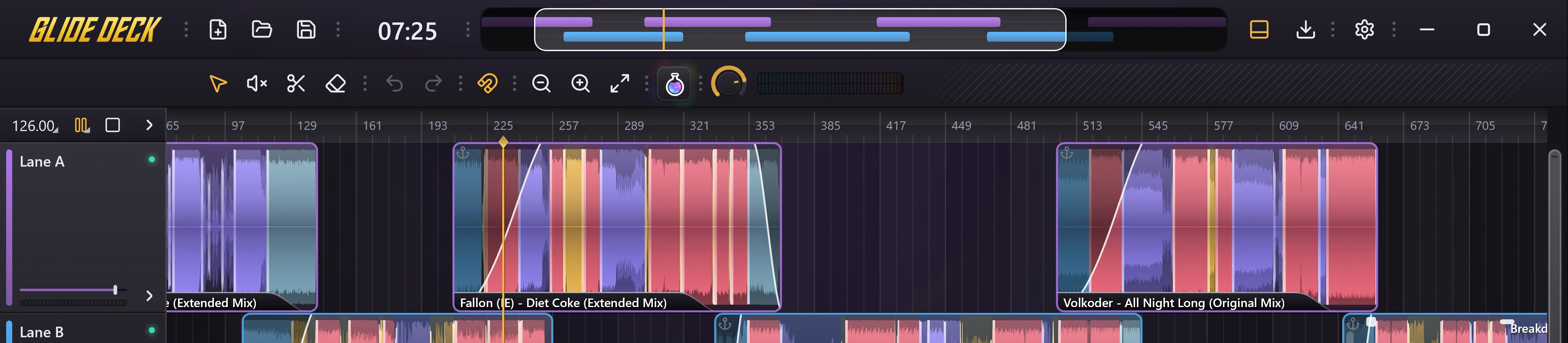
Pick a track in your library and GlideDeck brings it in the way a DJ would, in time and in step with what's already playing. Build a whole set in minutes, then fine-tune anything you like.
It's there to help you prepare tonight's set, or to experiment with combinations you'd never have tried.
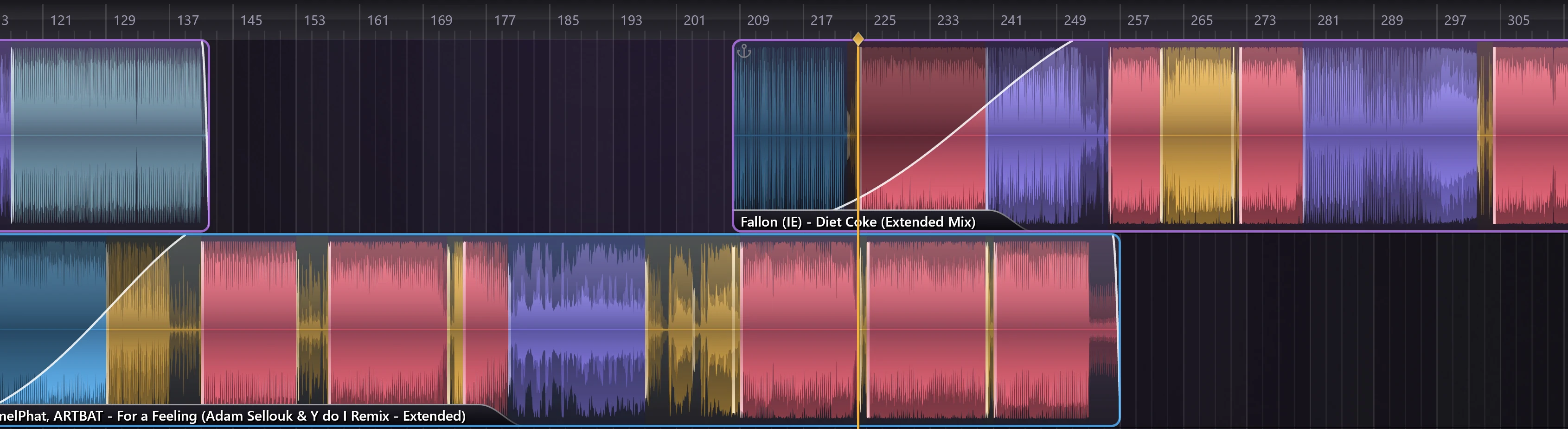
GlideDeck knows where each track builds, breaks and drops, and plans every handover around it, so one track flows into the next the way it would in a good DJ set.
Like what it did? Keep it. Want something different? Every transition is yours to change.

Switch on Mojo and your mix gets a polished, club-ready sound that adapts to what's playing.
It stays clean and loud, so the export is ready to share, and it still sounds like your mix.
Want Mojo in your own productions? It's also available as a plugin for Windows, Mac and Linux.
Automix gives you a starting point; lanes give you control. Draw volume, filter, EQ and pitch moves on any lane, right on the beat.
Add echo, gate and reverb, each on its own lane; echoes ring out naturally, bouncing left and right if you like. With the loop tool, turn a few bars of any track into a hat groove, a horn stab or a vocal hook.
Cut a hat groove, a vocal stab or a whole build out of any track. Join pieces into one, even with silence between them, and move, copy, fade and turn them up together.
Save it to your library and it's there for every mix: it lands on the beat, at that mix's tempo, right where it sat in the bar.
Drag in songs or whole folders. GlideDeck gets to know them in the background, tempo, key, cues and sections, while you keep working, and suggests what fits after the track that's playing.
Reorganised your music? Your mixes still find their tracks.
| Track | BPM | Key |
|---|---|---|
Opening track Artist A | 122.00 | A min |
Next up Artist B | 123.00 | E min |
Warm groove Artist C | 122.50 | C maj |
Peak time Artist D | 124.00 | D min |
Odd one out Artist E | 128.00 | F♯ min |
Connect an AI assistant and it can prepare a mix in the running app: place tracks, write automation and effects, set Mojo, even export.
Everything it does is ordinary GlideDeck work on your timeline, so you can hear it, undo it and change it like anything you made yourself.
Export the whole mix as MP3 at 320 kbps, 24-bit WAV, lossless FLAC, OGG or Opus, exactly as it plays: every automation move, every tempo glide, Mojo included.
GlideDeck opens fast, scrolls smoothly and stays light on your computer.

Sure, with a lot of work you can do the same in a DAW (digital audio workstation). We tried, and it was cumbersome: hours of lining things up before you ever get to the fun part, the moment one track melts into the next.
So we built GlideDeck for ourselves first and foremost, to meet our own high expectations. It meets them in spades, and now we want to share it with every music lover, DJ or not.
Double-click a track and it joins the mix, in time and ready to play.
Split any track into its vocals and its instrumental, and drag either one onto its own lane.
Blends that sound right, with the energy kept up from one track to the next.
Everything stays in time, and a clear grid and waveforms show you where every beat lands.
Speed your set up or slow it down, with smooth glides between tracks.
One button for a polished, club-ready sound.
Volume, filter, EQ and pitch, drawn right on the beat.
Effects on their own lanes, always in time, with echoes that ring out naturally.
Join regions into one: move, copy, fade and turn them up together.
Save a chop or a whole group to your library, then drop it into any mix, on the beat.
Turn a few bars into a loop: a hat groove, a horn stab, a vocal hook.
MP3, WAV, lossless FLAC, OGG or Opus, exactly as it plays.
Pick your look for the interface, regions, lanes and meters.
Tempo, key, cues and sections for every track, and suggestions for what fits next.
Moved or renamed your files? Your mixes still find their tracks.
Let an AI assistant prepare a mix for you, right in the app.
An introductory price for the people who buy early and help shape what comes next. It goes up to €99 later.
Prices in euros, excluding VAT and sales tax, added at checkout for your country. Sold through Link, operated by Stripe, our Merchant of Record. Try it free for 14 days first: no refunds after purchase.
Yes. For 14 days everything works, with no feature held back: you start it with your email, no card. After that, opening, editing and saving your mixes keeps working; exporting needs a licence.
Up to three of your own computers at the same time. Getting a new one? Activate it there and the licence moves from the oldest.
Yes. Every update up to the last 1.x version is free, and a licence bought before 1.0 includes 1.0 too. If a GlideDeck 2 ever comes, it's optional: the version you have keeps working, offline, for good.
Yes. GlideDeck runs on Windows 10 and 11 (64-bit) and on macOS, on Apple silicon and Intel Macs alike. One licence works on all of them.
Yes, on a recent x86_64 (Intel or AMD) distribution with a Wayland desktop (GNOME, KDE Plasma and the like). Get it from the download page; your licence works there too.
Not yet. GlideDeck works with the music files on your computer: drag in songs or folders. It doesn't connect to rekordbox, Serato or other DJ software libraries, nor to Beatport, Beatsource or streaming services.
Purchases are sold through Link, operated by Stripe, our reseller and Merchant of Record. It takes the payment, charges the right sales tax or VAT for your country and sends your receipt.
More on activation, moving computers and refunds in Support.
Download GlideDeck, drop in a folder of tracks and double-click. Free for 14 days, every feature, no card.
Want a feature in the next version of GlideDeck? Drop us a line.